
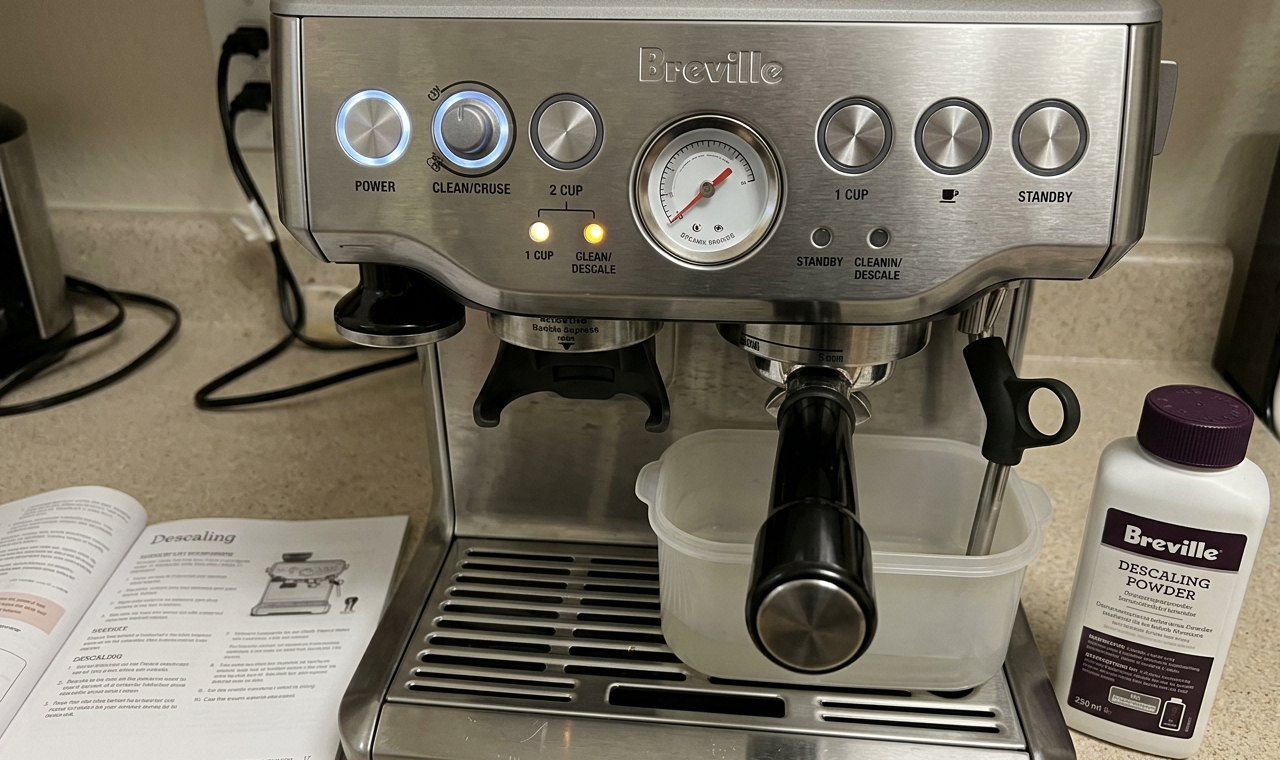
I run a DeLonghi at home, so I’ll be straight with you: I’m not a daily Breville owner. But I’ve descaled enough friends’ Barista Express machines — and talked enough of them through it over text — to know the places where Breville tends to trip people up. It usually isn’t the descaling itself. It’s the light. People get a glowing CLEAN/DESCALE indicator, can’t tell whether it wants a cleaning tablet or a full descale, can’t figure out how to start the cycle, and then the light won’t switch off afterward.
That’s the real friction, and it’s specific to Breville. Compared with a DeLonghi, where the descale flow feels more linear, Breville makes you read the light first and then enter a dedicated mode with a button combination — and that one combined light means two different things depending on whether it’s flashing or steady. So this guide is built around those sticking points: what the light is telling you, how to get in and out of descale mode on each model, and how to clear the light when you’re done. (If you own a DeLonghi instead, the Magnifica descale guide covers that path — the steps there are genuinely different.)
Still deciding whether a Breville is even right for you versus a hands-off super-automatic? I compared the Barista Express against the DeLonghi Magnifica here. And if you’re reading this before buying rather than after — here’s my honest take on whether the Barista Express is worth it in the first place.
What the Breville CLEAN/DESCALE light actually means
Here’s the single most useful thing to understand before you touch a button: on the Barista Express, there is no separate “descale light.” There’s one combined CLEAN / DESCALE indicator, and the way it behaves tells you which job the machine wants.
On the standard Barista Express (BES870):
- Light flashing → the machine wants a cleaning cycle. This is a backflush: a cleaning disc and a cleaning tablet in the portafilter, run through the group head. It clears coffee oils, not minerals.
- Light solid (steady, not blinking) → the machine wants a descale. This is the mineral job — flushing limescale out of the boiler and water lines with a descaling solution.
This is exactly backwards from what most people assume. Almost everyone reads a blinking light as the more “serious” alert and reaches for descaler. On the Barista Express it’s the opposite: blinking is the routine cleaning tablet, steady-on is the descale. I’ve watched friends run three cleaning cycles trying to make a solid light go away — it never will, because the machine is asking for descaler, not a tablet.
A couple of things so you don’t misread the panel. A light that flashes briefly at startup while the machine heats is normal warm-up, not a maintenance request — wait for it to settle. And if the two cup-size lights (1 CUP and 2 CUP) flash together, that’s usually a grinder or hopper seating issue, not a descale prompt.
Two models break from this flash-versus-solid language entirely. The auto-tamping Barista Express Impress (BES876) uses the same descale button combo as the Express, but its panel labels the indicator a Maintenance light rather than CLEAN/DESCALE — so read your panel’s maintenance prompt rather than the flash/solid rule above. And the Barista Pro and Touch skip the guesswork completely: they tell you in plain words on the display.
Descaling sits one level up from routine cleaning. For the bigger picture on what scale is and why every machine needs it, the main descaling guide covers the fundamentals — this article assumes you already know you need to descale and just want the Breville-specific mechanics.
Breville descale mode by model — quick button reference
Different Breville machines enter descale mode in genuinely different ways, depending on whether they have buttons, an LCD, or a touchscreen. Here’s the whole lineup at a glance, then the detail below.
| Model | “Needs descaling” signal | Enter descale mode | Start the cycle |
|---|---|---|---|
| Barista Express (BES870) | CLEAN/DESCALE light solid | Machine off → hold 2 CUP + POWER ~5s until POWER flashes | Press 1 CUP, then steam dial right, then left |
| Barista Express Impress (BES876) | Maintenance light | Machine off → hold 2 CUP + POWER ~5s | Press 1 CUP, then work the dial (as Express) |
| Barista Pro (BES878) | “Descale” prompt on LCD | MENU → grind dial to DESCALE → press to select | Press 1 CUP |
| Barista Touch (BES880) | “Descale” prompt on touchscreen | Tap gear/Settings → Descale | Follow on-screen Start |
| Bambino Plus (BES500) | 1 CUP + 2 CUP + STEAM flash alternately ~15s | Machine off → hold 1 CUP + STEAM ~5s | Press 1 CUP or STEAM |
| Bambino (non-Plus) | 2 CUP flashes continuously | Hold 2 CUP + STEAM ~5s | Cycle starts; press 2 CUP to advance to rinse |
One combo people mix up on the button machines: holding 1 CUP + 2 CUP + POWER for three seconds does not descale — that’s the shortcut for the cleaning cycle (the tablet backflush). To descale the Express, it’s 2 CUP + POWER. Reaching for the wrong pair is half of why people end up running the wrong maintenance job.
How to put your Breville into descale mode
There are three control families, and the right approach depends entirely on which one you own.
Button-only machines — Barista Express (BES870) and the Express Impress (BES876). No screen, so you use a button combination:
- Make sure the machine is off (all lights dark).
- Press and hold the 2 CUP button, and while still holding it, also press and hold the POWER button.
- Keep both held about five seconds, until the POWER button starts flashing. That confirms you’re in descale mode and the machine is preparing for the cycle.
- It’s ready to descale when the POWER, 1 CUP, CLEAN/DESCALE, and HOT WATER/STEAM lights are all lit solid at once.
If the 1 CUP light comes on by itself instead, you didn’t hold long enough or the machine still thinks it wants a cleaning cycle — turn it off and start again.
LCD machine — Barista Pro (BES878). The Pro has a small screen and a menu, so you navigate rather than hold buttons. Press MENU, turn the grind amount dial to scroll to DESCALE, then press the dial to select. The 1 CUP button lights up — press it to start. The LCD shows which stage you’re on and beeps between stages. On the Pro the cleaning cycle is a separate menu item called FLUSH, reached the same way, so there’s no flash-versus-solid guessing.
Touchscreen machines — Barista Touch (BES880) and Touch Impress. Everything happens on the display. Tap the gear / Settings icon, choose Descale, and start. The screen walks you through each stage — tank, group head, steam, hot water — in order, so you just follow the prompts. This is the most forgiving of the bunch for anyone who finds button combinations fiddly.
So identify your control type first. The button combo only applies to the Express family; on the Pro and Touch, hunting for a button combination is wasted effort because the function lives in the menu instead.
How to descale a Breville Barista Express — full walkthrough
The Barista Express is the model people ask me about most, so here’s the complete sequence. Block out 30 to 45 minutes, and don’t rush the rinse — that’s where most of the lingering-taste complaints come from.
Before you start:
- Turn the machine off and let it cool for at least 15 minutes if you’ve pulled shots that morning. Descaling a hot machine is both unsafe and harder to control.
- Empty the drip tray and slide it back in.
- Remove the water filter from inside the tank. You don’t want descaler running through the filter — it shortens the filter’s life and works against what you’re trying to do.
- Add your descaler to the tank and fill to the DESCALE line. Follow the dose on your solution’s pack.
- Put a container holding at least 2 litres under the group head and steam wand.
Run the descale:
- Enter descale mode (2 CUP + POWER held until the power light flashes). Wait for POWER, 1 CUP, CLEAN/DESCALE, and HOT WATER/STEAM to all sit solid.
- Coffee path: press the 1 CUP button. Solution runs through the group head.
- Steam path: turn the steam dial right, toward the steam icon. Let it run, then return the dial to STANDBY.
- Hot water path: turn the dial left, toward the hot water icon. Run it, then back to STANDBY.
After that first pass, roughly half the solution is still in the tank. Repeat steps 2 through 4 to use the rest. The reason all three paths matter: scale builds up wherever heated water travels, and the steam and hot water circuits are the ones people forget. Skip them and you’ve only half-descaled the machine.
Rinse — the part not to shortcut:
- Remove the tank, rinse it well, and refill with fresh, clean water to the max line.
- Empty your catch container and put it back.
- Run the entire sequence again with plain water — coffee path, steam, hot water, both passes. You’re flushing every trace of solution out of the same circuits you just cleaned.
- Press POWER to exit. The lights switching off tells you you’ve left descale mode.
One tank of descaler, one tank of rinse water, both run through all three paths. If your espresso ever tastes faintly sour or chemical after a descale, it’s almost always under-rinsing — run an extra plain-water tank and it clears.
How to clear the descale light after descaling
This is the question I get more than any other — “I descaled, why is the light still on?” — so let’s deal with it directly.
When the descale cycle is completed correctly, the CLEAN/DESCALE light turns itself off. There’s no separate reset button for it in normal use. A light that’s still lit afterward is the machine telling you one of two things.
The cycle wasn’t actually completed. This is the common one. The light stays on if you exited early, skipped the steam or hot water path, or never reached the “all lights solid, ready” state before starting. The fix is to run descale mode again, all the way through, and make sure you press POWER to exit at the end rather than just switching off mid-cycle.
The machine needs a nudge. If you’re confident the descale ran fully and the light won’t clear, unplug it for about 10 minutes. A full power-down clears most lingering software flags, and this alone resolves a surprising number of stuck-light cases.
As a last resort on the Barista Express, a factory reset — press and hold the PROGRAM button until you hear three beeps, then release — restores default settings and can occasionally shake a stuck flag loose along with them. Two caveats worth knowing: this wipes any saved shot volumes and temperature tweaks, so you’ll reprogram those afterward, and it’s a settings reset first, not a dedicated light-clearing tool. If the light persists, the reliable fix is confirming the cycle actually completed, then the unplug above — not the reset.
If the light still won’t go, and especially if water flow is weak or nothing comes through the group head, that points past a software glitch toward a physical blockage in the water path — a repair conversation rather than a reset one. But that’s rare. On the Pro and Touch, the on-screen prompt clears the same way: finish the cycle properly and the display returns to ready on its own.
What to use: descaler, citric acid, and why not vinegar
Descaling solution is cheap, and this is genuinely low-stakes spending. Any descaler labelled for espresso or coffee machines will do the job — they’re all variations on a mild acid that dissolves mineral scale. You’ll see them sold as powder sachets, liquid bottles, and tablets; the format is about convenience, not effectiveness.
A few honest notes on the options:
- Branded vs. generic. Breville does sell its own descaler, but its formula is essentially a malic/citric/sulfamic acid blend — there’s no special sauce you can’t get elsewhere. Paying a premium for the brand name isn’t necessary; a reputable compatible descaler does the same work. A lactic-acid compatible descaler is an easy, low-cost option that rinses clean.
- Citric acid powder is the enthusiasts’ budget pick. Food-grade citric acid dissolves scale just as well, costs a fraction, and rinses cleaner than most alternatives. If you don’t mind measuring it yourself, it’s hard to beat on value.
Now the question I actually get asked — vinegar. Can it dissolve scale? Yes, it’s acidic. But Breville advises against it, and so do I, for reasons that are practical rather than superstitious:
- It’s rough on seals. Acetic acid is more aggressive on the rubber gaskets it contacts than a purpose-made descaler. Occasional use probably won’t wreck a machine, but it’s not something you want as a routine.
- The smell lingers. Vinegar is genuinely hard to rinse out, and any residual scale inside the machine is porous enough to hold the odour. That’s how you end up with espresso that tastes faintly of salad dressing for a week.
- It’s slow. By the usual comparisons, acetic acid takes several times longer to dissolve the same scale that citric acid handles quickly.
- Warranty. Some Breville warranty terms specify approved descaling products. Vinegar probably won’t be the thing that voids a claim, but it’s an avoidable grey area.
And the point that ties back to the whole article: vinegar doesn’t replace the cleaning cycle. It may dissolve mineral scale, but it does nothing for coffee oils — and descaling was never supposed to. That’s the cleaning tablet’s job. So if your CLEAN/DESCALE light is flashing, that’s a cleaning situation, and vinegar is the wrong tool entirely.
What I use
De’Longhi EcoDecalk Universal Descaler (5 uses)
Don’t let the DeLonghi name confuse you — it’s a universal lactic acid formula and it’s what I run through any machine, Breville included.
Check price on AmazonModel-by-model notes: Bambino, Bambino Plus, Barista Pro, Barista Touch
The Express logic covers a lot of the lineup, but the smaller and smarter machines have their own quirks worth spelling out.
Bambino Plus (BES500): Breville treats cleaning and descaling as separate jobs. For the cleaning-tablet cycle, the machine alerts you by flashing the 1 CUP and 2 CUP buttons. The manual describes entering cleaning cycle mode by holding 1 CUP + 2 CUP for about 5 seconds, then pressing either cup button to start the cycle. Be careful: the same button pair also appears in the factory espresso-volume reset procedure, so follow the cleaning section of your exact manual and make sure you have the cleaning disc/tablet installed before starting. For descaling, the Bambino Plus uses a different combo: with the machine off, hold 1 CUP + STEAM for 5 seconds to enter descale mode.
Bambino (the non-Plus model). Simpler still. It flashes the 2 CUP button continuously when it wants cleaning and descaling. With solution in the tank, hold 2 CUP + STEAM together for five seconds to start; the 2 CUP button flashes through the cycle, pauses when the tank empties, and you press 2 CUP again to advance to the plain-water rinse.
Barista Pro (BES878). The LCD machine. MENU → grind dial → DESCALE → 1 CUP to start, with the screen naming each stage as it goes. Its cleaning cycle is labelled FLUSH and reached the same way. The Pro’s screen removes essentially all the guesswork the Express’s combined light creates.
Barista Touch (BES880) and Touch Impress. Fully screen-guided. Gear/Settings icon → Descale → follow the prompts through tank, group head, steam, and hot water in order. The most hand-holding of any Breville for this task.
The pattern across all of them: the cleaning and descaling jobs are always separate, and the machine always wants you to run solution through every heated path, not just the group head. What changes model to model is purely how you get into the mode.
How often should you descale a Breville?
Breville’s general guidance is around every three months, but treating that as a fixed rule misses what actually drives scale — your water.
Scale forms from the dissolved calcium and magnesium in your water. The harder your water, the faster deposits accumulate in the boiler and lines, and the sooner the machine needs descaling. So the honest answer is a range, not a number:
- Hard water, daily use: you may be descaling closer to every 4–6 weeks. Let the machine’s own light or screen prompt guide you here rather than the calendar.
- Soft or filtered water, moderate use: every 3–4 months is realistic, sometimes longer.
- Using the in-tank Breville water filter and replacing it on schedule: this slows scale meaningfully and stretches the interval. It’s the single easiest lever you have.
The smartest approach is to let the machine tell you — its descale prompt is tied to actual usage, so it’s a more honest signal than a date. And if you’re on hard water, the most effective long-term move isn’t descaling more often; it’s reducing the mineral load going in, with filtered or softened water, so scale builds slower in the first place. The deeper logic of water hardness across any espresso machine is covered in the main descaling guide.
And since bad taste is usually what sends people descaling in the first place: if your espresso’s gone bitter, start with this diagnosis — the machine isn’t always the guilty one.
Frequently asked questions
How do I descale my Breville espresso machine?
Remove the water filter, fill the tank with descaling solution to the DESCALE line, and put a 2-litre container under the group head and steam wand. Enter descale mode and run the solution through the coffee, steam, and hot water paths, then refill with fresh water and run the whole sequence again to rinse. On the Barista Express you enter descale mode by holding the 2 CUP and POWER buttons together until the power light flashes; on the Barista Pro and Touch you select DESCALE from the menu or touchscreen.
How do I put a Breville into descale mode?
It depends on the model. On the Barista Express and Express Impress, turn the machine off and hold the 2 CUP and POWER buttons together for about five seconds until the POWER light flashes. On the Barista Pro, press MENU, scroll with the grind dial to DESCALE, and press to select. On the Barista Touch, tap the gear/Settings icon and choose Descale. On the Bambino Plus, turn the machine off and hold 1 CUP + STEAM for five seconds; on the standard Bambino, hold 2 CUP + STEAM for five seconds.
Can you use vinegar to descale a Breville espresso machine?
You can, but Breville advises against it and so do I. Vinegar’s acetic acid is harsher on rubber seals than a purpose-made descaler, the smell is hard to rinse out and can taint your coffee, and it works more slowly than citric acid. It may also conflict with warranty terms that specify approved products. Any espresso-machine descaler, or food-grade citric acid powder, does the job better and cheaper than you’d expect.
How do I clear the descale light on my Breville?
When the descale cycle finishes correctly, the CLEAN/DESCALE light turns off on its own. If it stays on, the cycle most likely wasn’t completed — run it again fully and press POWER to exit at the end. If it still won’t clear, unplug the machine for about 10 minutes; as a last resort on the Barista Express, a factory reset (hold PROGRAM until three beeps) can clear a stuck flag, though it also wipes your saved settings. A light that persists alongside weak or no water flow points to a blockage rather than a software issue.
How often should I descale a Breville?
Roughly every three months as a default, but it’s really driven by water hardness. On hard water with daily use you might descale every 4–6 weeks; on soft or filtered water, every 3–4 months or longer. Let the machine’s descale light or on-screen prompt guide you rather than the calendar, and use the in-tank water filter to slow scale buildup between cycles.